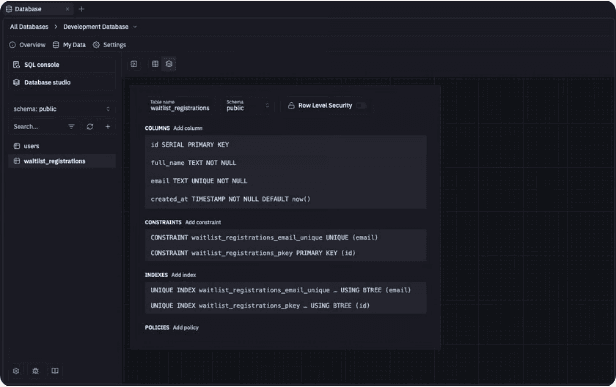
Bring business data and files into a live workspace
Teable AI controls the whole workspace
AI Field makes business data ready for action
Automate operations and email follow-ups
Build custom apps on live data
vs
Replit
Build code projects first, then connect data, permissions, workflows, dashboards, emails, and operations around the codebase.
Replit is a cloud development and AI software creation platform centered on code projects. Business workflows therefore depend on project code, database setup, deployments, and integrations. Teable is stronger when the real need is live records, apps, dashboards, approvals, automations, reports, email agents, and workflow history that business teams can run directly.
What is Teable?
Teable is the AI Spreadsheet for Business. Teams can connect and migrate data from any system into one place, upgrade their operations, and build a true AI business data hub for AI workflows and custom apps that 100% fit your business, helping your team become truly AI-native.
Teable offers leading AI agent technology and a best-in-class user experience. Simply by chatting with Teable AI, users can work with complex Excel, CSV, and PDF files, configure tables and fields, analyze data, and build automations and custom apps across the entire workspace—with AI that understands real business context and takes action.
What is Replit?
Replit is a hosted coding and app development platform centered on software projects, agents, databases, deployments, and integrations.
When the work is really a business operation, records, workflow state, dashboards, approvals, email agents, and routine changes remain software implementation work.
Open-core and fully featured when self-hosted, including automations and all AI capabilities.
LimitedReplit projects can be exported, but Replit remains a hosted development platform and the business operating layer must still be deployed and maintained as code
$20 Business includes 1M rows, apps, automations, AI Field, dashboards, and email agents
LimitedCore starts at $20/month with $25 credits; Pro starts at $95/month with $100 credits
Live business records
Capability
Teable
Replit
Starting point
Bring in business data, then build workflows, apps, dashboards, approvals, and automations around it
LimitedBusiness state lives inside the software project
Business records
Tables, fields, linked records, views, files, permissions, AI Field, SQL, comments, and history
LimitedOperations depend on project implementation
Business handoff
Teams run work from views, dashboards, forms, apps, approvals, comments, and records
LimitedWorkflow changes become code changes
Workflow output
Records become automations, apps, dashboards, reports, approvals, and email actions
LimitedOutput depends on the deployed app
Change safety
Records, permissions, automations, and workflow history stay intact when the app changes
LimitedBusiness changes require project updates
Teable
Teable is stronger when the app is really an operating workflow: leads, approvals, invoices, onboarding, content, projects, hiring, support, or customer follow-ups. The data stays visible and editable by the team, while AI builds the workflow around it.
Use records, linked fields, files, views, permissions, comments, history, and AI Field as the operating layer.
Let Teable AI generate apps and dashboards, shape automations, configure fields, prepare scripts, and suggest next actions from live context.
Give business teams interfaces they can use without owning a code project.
Replit
Replit keeps business operations inside a software project, where workflow changes remain code changes.
Business state lives inside the software project.
Operations depend on project implementation.
Routine workflow changes become code changes.
Agent control
Capability
Teable
Replit
Agent scope
Teable AI operates across the whole workspace: records, tables, fields, views, SQL, files, apps, automations, scripts, integrations, and migration
LimitedThe Agent edits software, not the workspace
Business operations
Update, enrich, summarize, report, and act on live business records
LimitedBusiness operations depend on app logic
Field control
Configure fields, add AI Field, resolve source fields, and run batch AI fill from record context
LimitedField changes become schema changes
Complex work
Process spreadsheet files, PDFs, migration, classification, extraction, cleanup, and enrichment
LimitedComplex work becomes project logic
Business output
AI output becomes records, fields, apps, dashboards, automations, approvals, emails, and next actions
LimitedBusiness output depends on deployment
Teable
Teable AI is built to operate business data directly. It can configure structure, enrich records, build automations, generate apps, and prepare workflow actions without turning every change into a software development task.
Use Teable AI to update records, configure fields, build views, apps, automations, scripts, and workflow actions.
Use AI Field for summaries, tags, scores, extraction, translation, generated content, and workflow signals.
Use Teable AI to process files and migration tasks before generating apps or dashboards.
Replit
Replit AI edits the software project rather than operating a shared business workspace.
The Agent edits the software project.
Business operations remain project implementation.
Operational changes require code-level edits.
Business-fit custom apps
Capability
Teable
Replit
App generation
Build custom apps on live data with Teable AI and App Builder
Teable App Builder turns live business records into internal tools, portals, dashboards, and approval apps. The app stays connected to the same data, automations, permissions, AI Field, and workflow history.
Build custom apps on live data with Teable AI and App Builder.
Teable automations and email agents run from the business records themselves. That keeps reminders, approvals, Slack updates, reports, webhooks, and customer follow-ups connected to the data the team already trusts.
Build event-driven and scheduled workflows around live Teable records.
Use script actions, HTTP requests, Slack or webhook integrations, email actions, and AI steps.
Run context-driven email agents from customer data, business context, personal inboxes, and unsubscribe links.
Replit
In Replit, workflows and email behavior remain app-level implementation.
Workflows become application logic.
Email requires app-level setup.
Operational changes require project maintenance.
Open-core and self-hosting
Capability
Teable
Replit
Deployment path
Open-core and fully featured when self-hosted, including automations and all AI capabilities.
LimitedReplit projects can be exported, but Replit remains a hosted development platform and the business operating layer must still be deployed and maintained as code
Data ownership
Run business data, AI Field, automations, apps, dashboards, and email workflows in your Teable deployment path
LimitedProjects, hosting, databases, usage, and credits follow Replit's hosted platform model
Operations control
Keep the operating workspace, app layer, automation layer, and email workflow layer together
LimitedOperations depend on the code project, deployment, database setup, and integrations
Team control
Business teams can operate from tables, views, apps, dashboards, approvals, and workflow history
LimitedRoutine changes can still require project or code changes
Teable
Teable is open-core and fully featured when self-hosted, so the business data, AI, app, automation, dashboard, and email workflow layers can run on your infrastructure.
Use Teable Cloud for speed or self-host when deployment and data ownership matter.
Keep business records, apps, automations, dashboards, and email workflows together.
Control the operating workspace instead of making a hosted code project the center of operations.
Replit
Replit projects can be exported, but that does not provide a self-hosted business data, AI, automation, dashboard, and email operations workspace.
Projects can be exported or moved outside Replit.
Operating data and workflows still have to be deployed and maintained as software.
Teable self-hosts the data and operations workspace itself, not only the application code.
Pricing and value
Capability
Teable
Replit
Paid entry
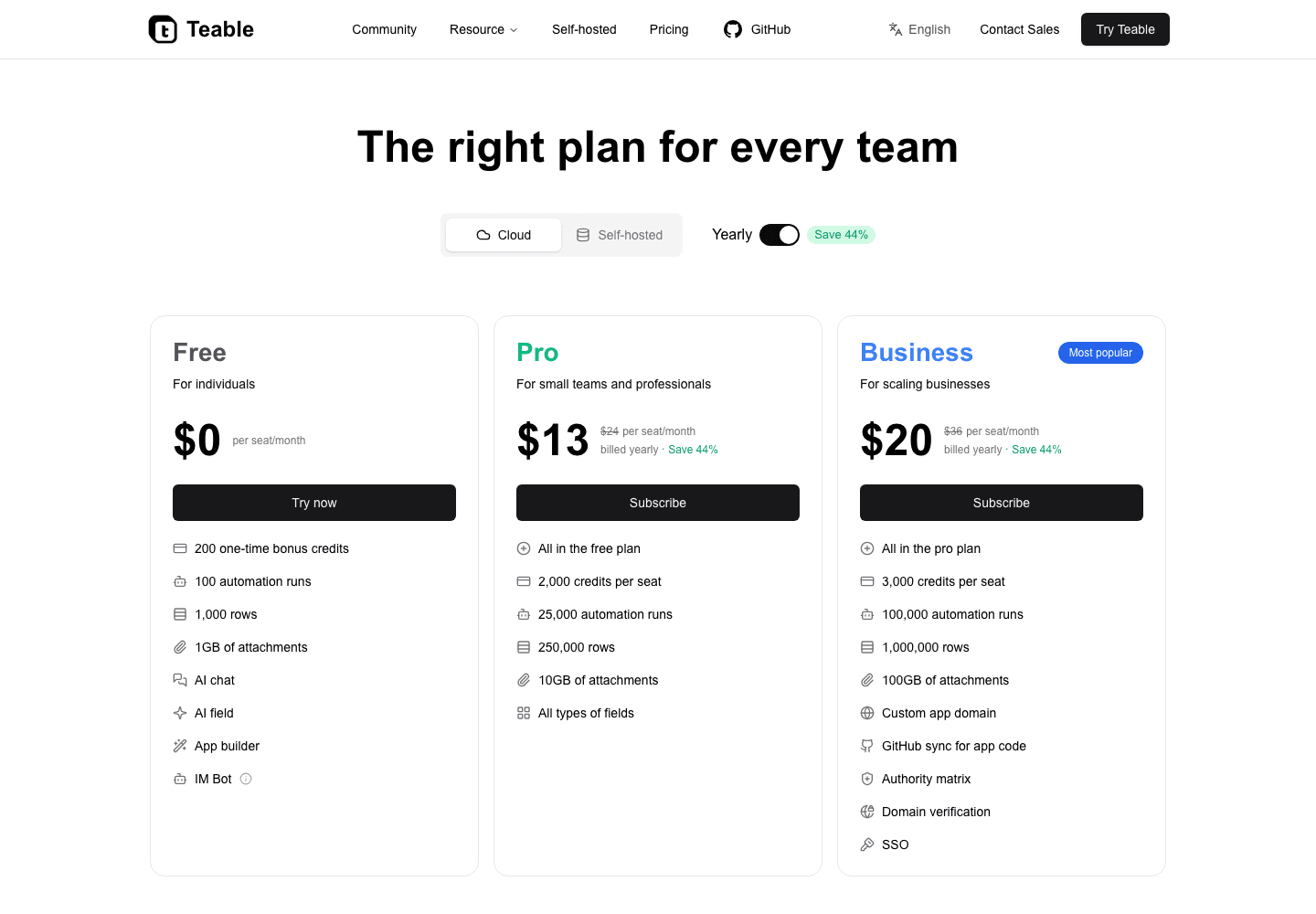
Teable Pro is $10 per seat/month on annual plans
Replit Core starts at $20/month with $25 credits
Pro tier
Teable Business is $20 per seat/month on annual plans
LimitedReplit Pro starts at $95/month with $100 credits
Included value
1M rows, AI Field, AI Chat, App Builder, automations, dashboards, and email agents
LimitedCredits cover agents and deployments; the business data, workflow, dashboard, approval, and email layer still has to be built and maintained in code
Run the business
Records, apps, automations, dashboards, approvals, reports, and email follow-ups in one workspace
LimitedThe code project still needs business data, workflow logic, approvals, reporting, and maintenance around it
Teable
Teable gives teams a lower price for the work business teams usually need: records, AI Field, automations, internal apps, dashboards, and email agents in one operations workspace.
Pro is $10 per seat/month and Business is $20 per seat/month on annual plans.
Business includes 1M rows, 100GB attachments, 100K automation runs, and 2,000 credits per seat/month.
Use one workspace for the database, AI, app, automation, dashboard, approval, and email workflow layer.
Replit
Replit pricing is centered on software creation, agents, deployments, and credits, while business operations still need records, permissions, workflow history, dashboards, approvals, and emails built around the app.
Core starts at $20/month with $25 credits.
Pro starts at $95/month with $100 credits.
Credits and deployments do not remove the need for a durable business operations workspace.
How to move from Replit to Teable
Move business-facing data and workflow state into Teable, then keep code only for custom edges that really need software development.
Option 1
Move internal-tool data into Teable
1Identify the Replit apps that mostly manage records, approvals, dashboards, forms, or internal workflows.
2Bring the underlying business data into Teable from the database, exports, connected source, or the Connect Everything skill when Teable AI can reach it.
3Use Teable AI to configure fields, AI Field, views, dashboards, app screens, and workflow stages.
4Generate Teable apps and automations so the business team can run the workflow without maintaining a code project.
Option 2
Keep code for custom edges
1Keep Replit for technical custom code when the workflow truly needs a software project.
2Use Teable as the live workspace for records, owners, status, files, approvals, and reporting.
3Use automations and AI Field for updates, reminders, summaries, emails, reports, and next actions.
4Connect custom code through API or webhooks only where the business workflow needs it.
This is not about replacing every software project. It is about moving business operations into Teable so records, apps, dashboards, approvals, automations, and emails stay connected.
Replit users usually ask
Is Teable a Replit alternative?
Yes, for business operations and internal tools. Teable can replace Replit when the work needs live data, AI Field, automations, apps, dashboards, approvals, and email workflows more than a code workspace.
What is the main difference between Teable and Replit?
Replit is a coding and app development platform. Teable is the AI spreadsheet for business, where records, AI Field, automations, dashboards, apps, and workflow history stay together.
When should teams choose Teable over Replit?
Choose Teable when the app is mainly an internal workflow, approval tool, CRM, tracker, portal, dashboard, or operational process that should be editable by business teams.
Can Teable replace every Replit project?
No. Keep Replit for custom software projects. Use Teable when the work is really business data, workflows, apps, dashboards, approvals, email agents, and operating history.
Can Teable build apps without a code workspace?
Yes. Teable App Builder can generate dashboards, portals, forms, approval tools, internal tools, booking pages, and workflow apps directly from live Teable records.
Can Teable automate internal workflows?
Yes. Teable can automate reminders, approvals, reports, Slack updates, webhooks, scripts, email actions, and next steps from live records.
Is Teable cheaper than Replit?
Teable Pro is $10 per seat/month and Business is $20 per seat/month on annual plans. Replit Core starts at $20/month with $25 credits, and Pro starts at $95/month with $100 credits.
Who should move from Replit to Teable?
Teams should move when internal tools need to stay connected to records, AI Field, automations, dashboards, approvals, email workflows, and business history without constant code maintenance.
Move from Replit to Teable
Turn your data into AI workflows and custom apps that 100% fit your business.