Bring business data and files into a live workspace
Teable AI controls the whole workspace
AI Field makes business data ready for action
Automate operations and email follow-ups
Build custom apps on live data
vs
Excel
Keep work in workbook files, tabs, formulas, copied versions, manual updates, macros, and separate tools as the business grows.
Excel is a spreadsheet application for formulas, analysis, charts, and file-based business work. It works for simple spreadsheet tasks. But as business operations grow, Excel often turns into scattered workbooks, large files, copied versions, hidden formulas, manual updates, and fragile handoffs. Maintaining the work takes more time than running the work, and the spreadsheet starts slowing the business down. Teable is the AI spreadsheet for business: bring Excel and CSV files into live records, then use Teable AI to structure fields, clean data, build workflows, run automations, create dashboards and apps, and send context-driven email follow-ups from one workspace.
What is Teable?
Teable is the AI Spreadsheet for Business. Teams can connect and migrate data from any system into one place, upgrade their operations, and build a true AI business data hub for AI workflows and custom apps that 100% fit your business, helping your team become truly AI-native.
Teable offers leading AI agent technology and a best-in-class user experience. Simply by chatting with Teable AI, users can work with complex Excel, CSV, and PDF files, configure tables and fields, analyze data, and build automations and custom apps across the entire workspace—with AI that understands real business context and takes action.
What is Excel?
Excel is a spreadsheet application for formulas, analysis, charts, and file-based business work.
It works for simple spreadsheet tasks. But as business operations grow, Excel often turns into scattered workbooks, large files, copied versions, hidden formulas, manual updates, and fragile handoffs. Maintaining the work takes more time than running the work, and the spreadsheet starts slowing the business down.
$0 Free includes AI Chat, AI Field, App Builder, automation, and apps
Excel for the web is free for basic spreadsheets
Structured data
Capability
Teable
Excel
Data organization
Records, fields, linked data, files, owners, and status stay organized in one workspace
Tabs, cells, workbook files, and lookup formulas for relationships
Latest version
Everyone works from the same live records
Scattered files and copied versions
Owner, status, and files
Each record keeps owner, status, files, comments, and permissions together
Context spreads across email, chat, comments, and files
Change history
Record history shows what changed and who changed it
Hidden formulas and manual edits are hard to track
Teable
Teable turns spreadsheet work into a live relational workspace. Each business item becomes a record with typed fields, linked records, owners, status, files, comments, permissions, and history, so the team works from one current system instead of maintaining separate workbooks.
Model customers, invoices, projects, requests, reports, assets, and operations data as records with fields and views.
Keep ownership, status, files, comments, permissions, linked records, and history attached to the record.
Use the same records for AI Field, automations, dashboards, apps, approvals, and email follow-ups.
Excel
Excel is useful for analysis, formulas, and one-off models. It breaks down when a workbook becomes the place a team runs customers, invoices, projects, approvals, or operations: data gets copied into more files, context lives outside the sheet, and there is no reliable operational record.
Rows are cells in files, not records with owners, status, files, permissions, comments, and workflow history.
Linked data often depends on VLOOKUP, XLOOKUP, formulas, copied ranges, or manually matched sheets.
The latest version, business rules, and approvals are often split across copied workbooks, formulas, macros, email, chat, and folders.
As files grow, manual updates and version checks slow reporting, decisions, and handoffs.
Agent control
Capability
Teable
Excel
Agent scope
Teable AI operates across the whole workspace: records, tables, fields, views, SQL, files, apps, automations, scripts, integrations, and migration
Copilot stays inside the workbook
Data operations
Add, update, structure, and verify records, tables, fields, views, AI Field, and dashboards
Most workbook operations still need user direction
Complex tasks
Handle multi-file spreadsheets, large PDFs, classification, extraction, cleanup, enrichment, and long-running tasks
Complex business work remains workbook-based
Apps and automation
Ask Teable AI to build workflow structure, automations, dashboards, apps, scripts, and next actions
Apps and workflows need other products
AI Agent in messaging apps
Use Teable AI in chat and messaging workflows for team operations
No native Excel Agent that operates workbooks from messaging apps
Teable
Teable AI is designed to operate the workspace itself. It works on records, tables, fields, views, SQL, files, apps, automations, integrations, scripts, AI fill, dashboards, email actions, and migration instead of leaving people to maintain workbook logic by hand.
Ask Teable AI to update records, configure fields, build views, generate apps, shape automations, and prepare workflow actions.
Import Excel or CSV, query data with SQL, process large files, generate script actions, build automations, and trigger AI fill.
Use Teable AI in chat and messaging workflows for team operations.
Excel
Excel has formulas, pivots, filters, macros, and scripts, but it does not have an agent that operates a live workspace. When a spreadsheet becomes a workflow, people still maintain the workbook logic, file setup, and handoffs around it.
People maintain formulas, filters, pivots, macros, scripts, workbook setup, and cleanup by hand.
Workflow context still has to be coordinated through tabs, comments, files, email, chat, and folders.
App building, automation, file processing, and workflow setup require manual work or separate tools.
AI Field
Capability
Teable
Excel
Native AI Field
AI is a real field in the live table, tied to records, source fields, prompts, and model settings
No reusable AI Field
Record context
Reads full record context: customer data, status, owner, files, notes, and linked records
AI reads workbook cells, not live records
AI-generated fields
Generate scores, tags, categories, extracted fields, summaries, translations, and follow-up copy directly into live fields
AI output remains spreadsheet content
Batch AI fill
Fill selected records, empty fields, or filtered views at scale with the same reusable AI Field
Bulk work remains workbook-based
From result to action
AI-filled fields can immediately drive views, approvals, automations, apps, reports, emails, and next steps
Results need other tools to drive workflows
Teable
Teable AI Field makes AI native to the data layer. Each AI Field reads the live record, uses the source fields and prompt you define, fills records at scale, and stores the result as a field the rest of the workspace can use.
Configure source fields, prompt, model, and output once, then reuse the AI Field across the table.
Generate scores, tags, categories, extracted fields, summaries, translations, and follow-up copy from record context.
Use AI-filled fields immediately in views, approvals, automations, apps, reports, emails, and next steps.
Excel
Excel can calculate, but classification, extraction, summarization, scoring, and generated copy still have to be built around the workbook. Teams patch together formulas, helper columns, VBA/scripts, copied prompts, and manual checks, then repeat the work when the data or rules change.
Formulas read cells, not the customer, owner, status, file, note, and linked-record context around the work.
Classification, extraction, summarization, and scoring become fragile spreadsheet workarounds instead of reusable fields.
Outputs stay in workbook cells, so people still copy, send, clean up, or connect another tool before the business can use them.
Super automation and email agents
Capability
Teable
Excel
Build with AI
Describe the workflow to Teable AI, then let it shape triggers, actions, scripts, approvals, reports, and follow-ups
No native record-triggered workflow layer
Live record context
Automations run from live records with owners, status, files, AI Field output, run history, and business context
Business context remains inside files
Operational workflows
Run reminders, approvals, reports, Slack updates, webhooks, alerts, and task handoffs from the same workspace
Automation needs surrounding Microsoft tools
Email agents
Send personalized follow-ups from customer data, record details, business context, personal inboxes, and unsubscribe links
No business-aware email agent
After automation runs
Write results back to records, dashboards, apps, approvals, email agents, and next actions
History stays across files and tools
Teable
Teable AI Automation turns live records into business processes. Describe the workflow to Teable AI, use record context and AI Field output, then run approvals, reports, Slack updates, webhooks, scripts, alerts, and personalized email follow-ups from the same workspace.
Build event-driven or scheduled workflows around live records, owners, status, files, AI Field output, and run history.
Use AI to shape triggers, actions, scripts, HTTP requests, Slack/webhook steps, approvals, reports, and alerts.
Send business-aware email follow-ups from customer data, business context, personal inboxes, and unsubscribe links.
Excel
Excel can support formulas, macros, scripts, and Power Automate, but the workbook is still not a native operations layer. As workflows grow, teams maintain files, scripts, messages, exports, and follow-up tasks around the spreadsheet.
Workflow context is split across sheets, comments, files, email, chat, and manual notes.
Approvals, reports, alerts, and follow-ups require formulas, macros, scripts, Power Automate, or separate tools.
After something runs, people still copy results, update files, send messages, or rebuild the next step somewhere else.
Custom apps
Capability
Teable
Excel
Build with AI
Build custom apps on live data with Teable AI and App Builder
Excel has no native AI app builder; teams need Power Apps, custom development, or another tool around the workbook
LimitedCharts, tables, workbook dashboards, and forms usually need another app layer to run the workflow
Live operations
Apps read and write live records, fields, files, permissions, AI Fields, automations, dashboards, and email actions
No native live operations layer; apps built around Excel can drift or depend on manual sync and external logic
Business fit
Add login, custom domains, integrations, and workflow-specific behavior without moving data out of Teable
Excel stays a workbook; portals, internal tools, permissions, and workflow logic live somewhere else
Teable
Teable App Builder turns spreadsheet data into apps that can run the business. Build custom apps on live data with Teable AI and App Builder, and keep them connected to AI Fields, automations, dashboards, permissions, history, and email actions.
Build dashboards, portals, approval apps, booking pages, CRUD tools, calculators, and internal apps from live records.
Preview changes with Teable AI while apps read and write the same records, fields, files, permissions, AI Fields, automations, dashboards, and email actions.
Run approvals, intake, reporting, customer workflows, finance, hiring, and operations without moving the data to another app stack.
Excel
Excel can create charts, tables, and workbook dashboards, but it is still a file, not an app builder. To create portals, approval apps, internal tools, or customer workflows, teams usually add Power Apps, scripts, custom development, another database, or another app platform around the workbook.
Workbook dashboards depend on file structure, refresh discipline, formulas, and manual updates.
App behavior, permissions, workflow logic, and app state often move outside the spreadsheet.
When the app layer sits outside Excel, context, history, approvals, and next actions can drift from the source data.
Pricing and value
Capability
Teable
Excel
Free option
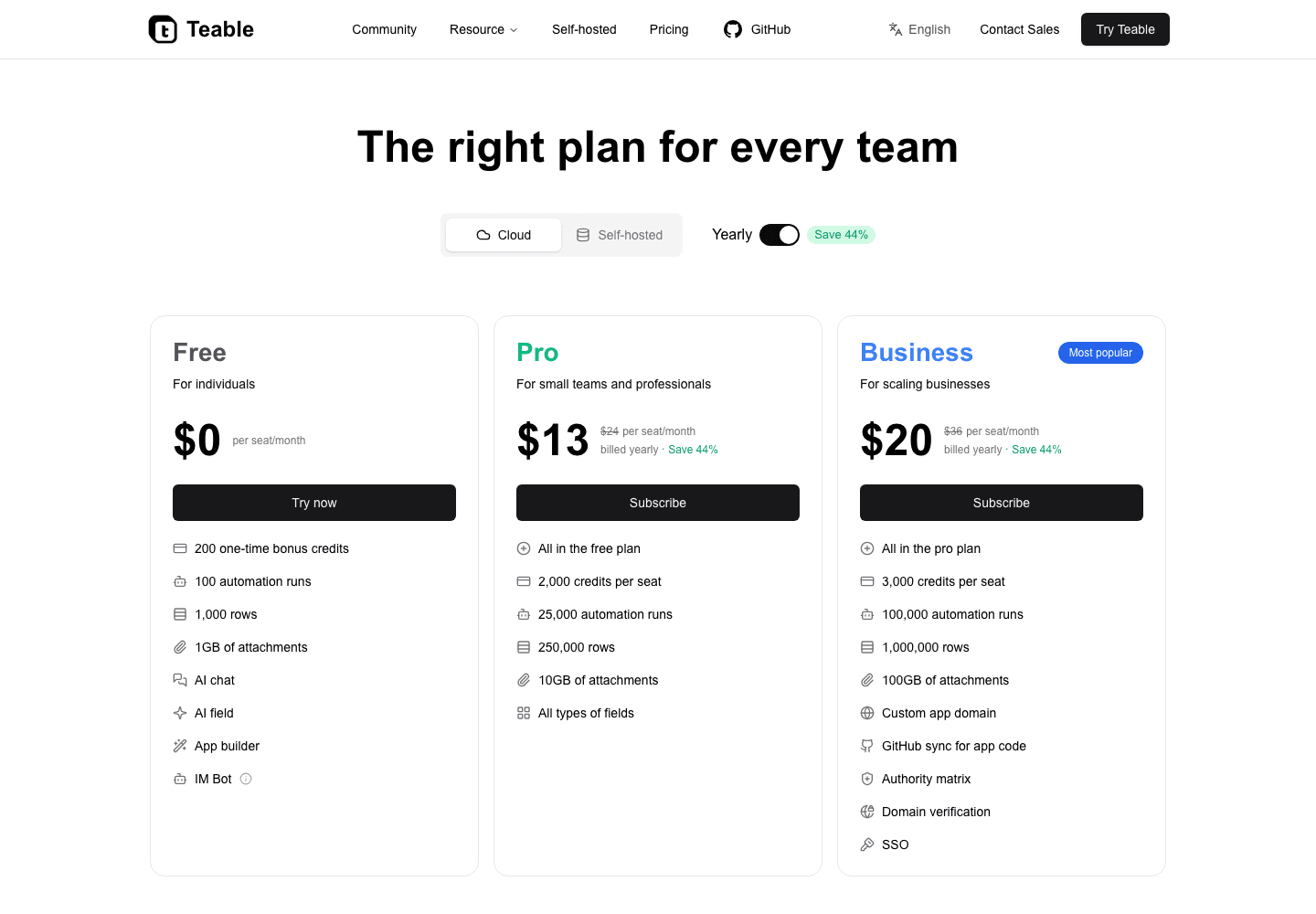
$0 Free includes AI Chat, AI Field, App Builder, 100 automation runs, 1,000 rows, and 1GB attachments
Excel for the web is free for basic spreadsheets
Same $10 business plan
$10 Pro gives AI Chat, AI Field, App Builder, 25K automation runs, more AI credits, and 10GB attachments
Limited$10 Microsoft 365 Apps gives desktop Excel and Office apps, but not AI workflows, automations, or apps
Run the business
Records, AI Field, automations, dashboards, apps, approvals, reports, and email follow-ups stay in one workspace
LimitedRunning the same work around Excel usually means extra app builders, automation tools, email tools, dashboards, scripts, or databases
Business value
$20 Business adds 100K automation runs, 2,000 credits per seat, custom app domain, SSO, and 100GB attachments
LimitedTo run apps, approvals, automations, dashboards, and email follow-ups from Excel, teams still need extra tools
Teable
Teable pricing is stronger when the spreadsheet has become business operations. Free already includes AI Chat, AI Field, App Builder, automation, and apps. At the same $10 business seat price as Microsoft 365 Apps for business, Teable Pro gives teams a live AI operations workspace instead of only desktop Excel and Office apps.
Start at $0 with AI Chat, AI Field, App Builder, 100 automation runs, 1,000 rows, and 1GB attachments.
$10 Pro gives AI Chat, AI Field, App Builder, 25K automation runs, more AI credits, and 10GB attachments.
$20 Business adds 100K automation runs, 2,000 credits per seat, custom app domain, SSO, and 100GB attachments.
Excel
Free or paid, Excel is still a spreadsheet. Paying for Microsoft 365 gives teams desktop Office apps and storage, but it does not turn a workbook into AI workflows, automations, business apps, approvals, dashboards, email agents, or workflow history.
Free Excel is still a basic spreadsheet.
Paid Microsoft 365 adds desktop Office apps and storage, not an operations workspace.
No plan turns Excel into native AI workflows, automations, apps, and email agents.
To run business operations from Excel, teams still buy or build extra tools around the workbook.
How to move from Excel to Teable
Use Add from other sources for a guided spreadsheet import, or drop messy spreadsheet files into Teable AI and let it plan the workspace before importing.
Option 1
Use Add from other sources
1Open Add from other sources and choose spreadsheet import.
2Upload a clean Excel or CSV file.
3Review the detected sheets, columns, field types, and field mappings.
4Import the rows into Teable as typed fields and live records.
5Use the records in views, AI Field, automations, dashboards, apps, and email follow-ups.
Option 2
Drop the files into Teable AI
1Upload the messy workbooks, CSV files, or spreadsheet exports directly to Teable AI.
2Tell Teable AI what business workflow the files are supposed to become.
3Let Teable AI analyze sheets, columns, field types, and suggested field mappings before import.
4Confirm the plan, import the data as live records, then let Teable AI configure views, AI Field, automations, dashboards, apps, and email follow-ups.
If Excel is only for one-off analysis, keep it there. If it is running customers, invoices, approvals, reports, or operations, it is already doing a job spreadsheets were not built to do. Move that work into Teable so the same data can run AI workflows, apps, automations, dashboards, and email follow-ups.
Excel users usually ask
Is Teable an Excel alternative?
Yes. Teable can replace Excel-based business workflows when spreadsheets multiply, files get heavier, updates stay manual, and the team needs live records, AI fields, automations, dashboards, apps, approvals, and workflow history.
What is the main difference between Teable and Excel?
Excel is a spreadsheet application for files, formulas, analysis, and charts. Teable is the AI spreadsheet for business, built to turn rows into live records, AI workflows, automations, dashboards, apps, and email actions.
When should a team move business work out of Excel?
Move when Excel files become the operating system for customers, invoices, approvals, projects, hiring, marketing, or operations. That is when scattered files, large workbooks, copied versions, manual updates, and missing automation start slowing the business down.
Can Teable import Excel files?
Yes. Teable can import Excel or CSV files, analyze sheets and columns, infer field types, map fields, and import the data as live records.
Can Teable handle complex spreadsheet migration?
Yes. Teable can analyze Excel and CSV files, detect sheets, columns, and field types, suggest field mappings, and import the data as live records. For messy spreadsheet work, use Teable AI to review the structure before turning the data into fields, views, AI Field, automations, apps, and email follow-ups.
Can Teable AI configure fields after import?
Yes. Teable AI can configure fields, set up AI Field, resolve source fields, and run AI fill for summaries, tags, scores, extraction, translations, generated content, and follow-up copy.
Can Teable replace spreadsheet approval workflows?
Yes. Teable can turn rows into records with owners, status, permissions, automations, approval apps, dashboards, reports, and email follow-ups.
Can Teable build apps from Excel data?
Yes. Teable App Builder can generate dashboards, portals, forms, approval tools, internal tools, booking pages, and workflow apps from imported spreadsheet data.
Is Teable better value than Excel for business operations?
Yes, when the spreadsheet is running business operations. Excel for the web is free for basic spreadsheets. Teable Free already includes AI Chat, AI Field, App Builder, automation, and apps, while Teable Pro is $10 per seat/month for a live AI operations workspace.
Do teams need to stop using Excel completely?
No. Excel can remain useful for analysis, finance modeling, and one-off spreadsheet work. Teable is for the workflows that have outgrown files and now need live data, AI operations, automations, apps, dashboards, and workflow history.
Move from Excel to Teable
Turn your data into AI workflows and custom apps that 100% fit your business.